Skip to content

Finance ledger — profit without spreadsheets

Revenue comes in from your club’s shell — LanGame, SmartShell or Gizmo, payroll and deliveries from their ERP sections, and the ledger sorts the bank statement by itself. Profit and loss — by month and for each legal entity.

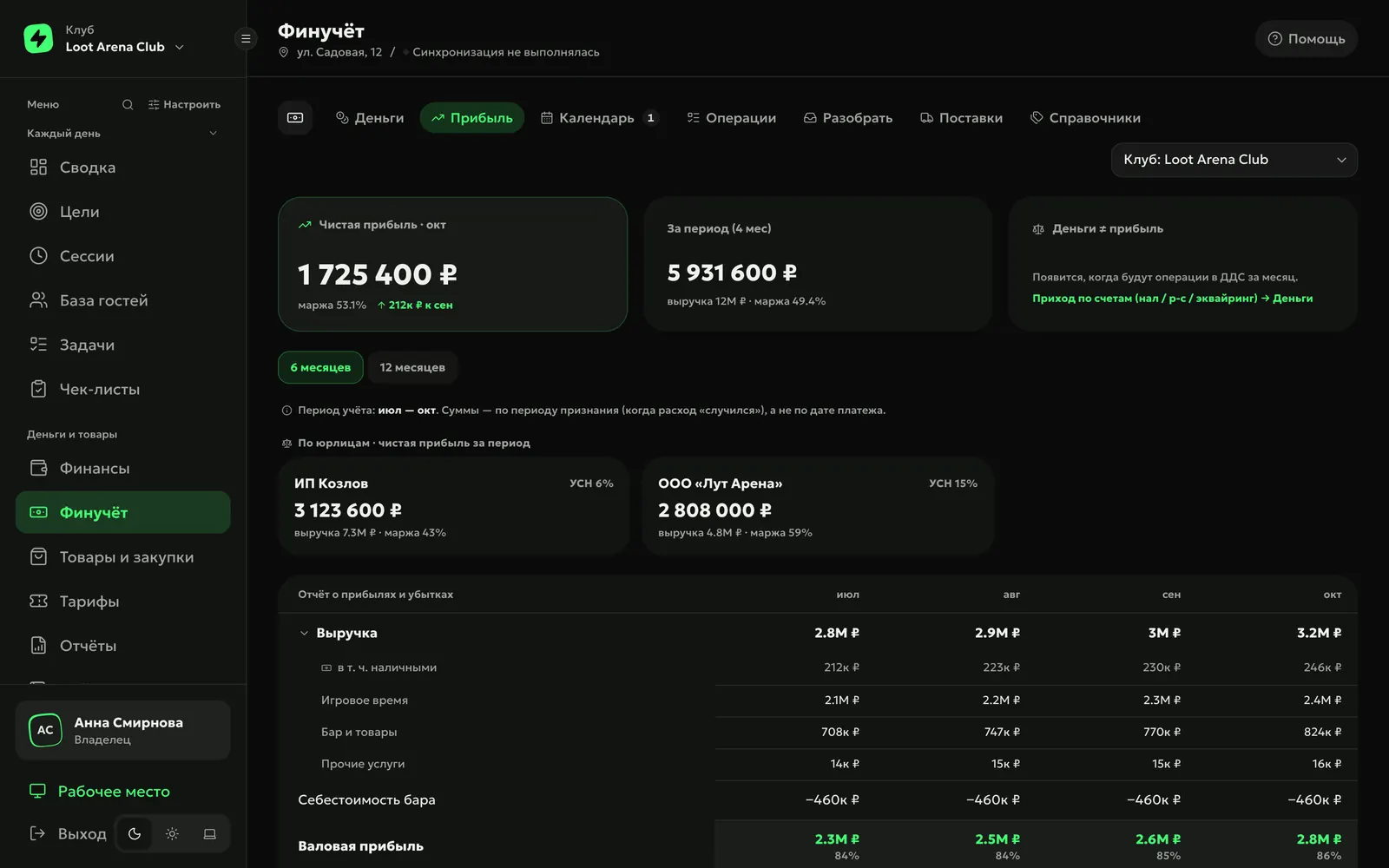
ERP, finance ledger, “Profit” tab: net profit for the month, profit by legal entity on USN 6% and USN 15%, and profit and loss by month

Club money sorts itself

Collect

Each shift’s revenue comes from the shell by itself: cash goes to “Cash register”, card payments to “Acquiring” until the bank credits them to the account. Cash collection comes from shifts, payouts from Payroll, supplier payments from Purchasing.

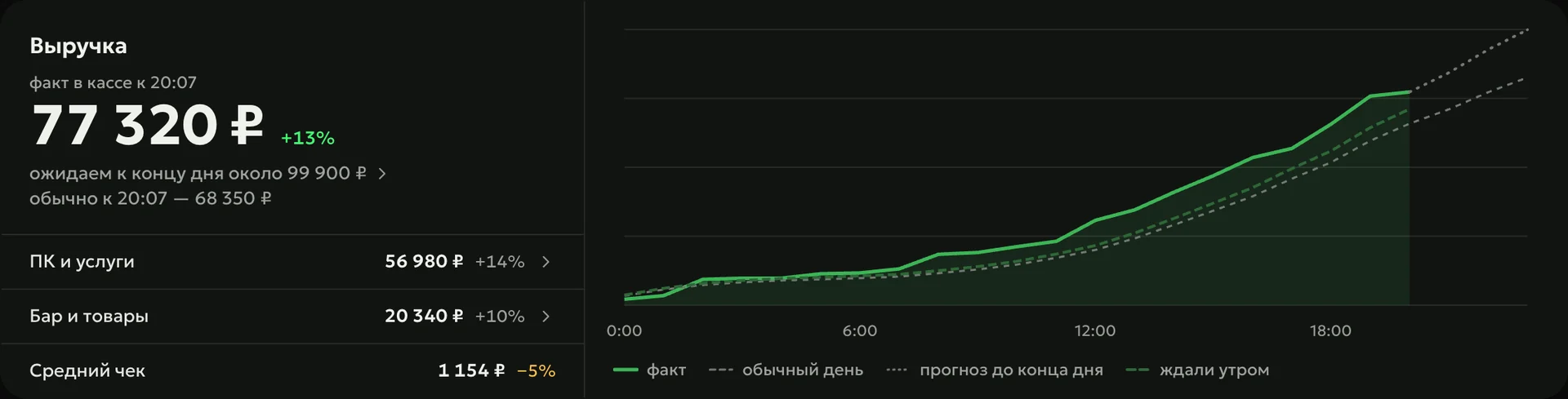
ERP, day revenue: 77,320 ₽ by 20:07, 13% above usual; PCs and services 56,980 ₽, bar and products 20,340 ₽, average check 1,154 ₽; chart of actual vs. a usual day and the forecast

Sort

You upload the bank statement as a 1C file (the Russian accounting format) or CSV, and the finance ledger sorts it by itself. Transfers between your own accounts become internal transfers, taxes, contributions and bank fees go to their own categories, and payroll payouts and supplier payments find the entry already recorded — nothing is counted twice.

  • Unrecognized lineswait in “To sort” with a suggested category, and the rule is remembered
  • Cash flow and profitmoney by payment date, profit by the month the expense belongs to
  • Any lineopens down to the payments it is made of
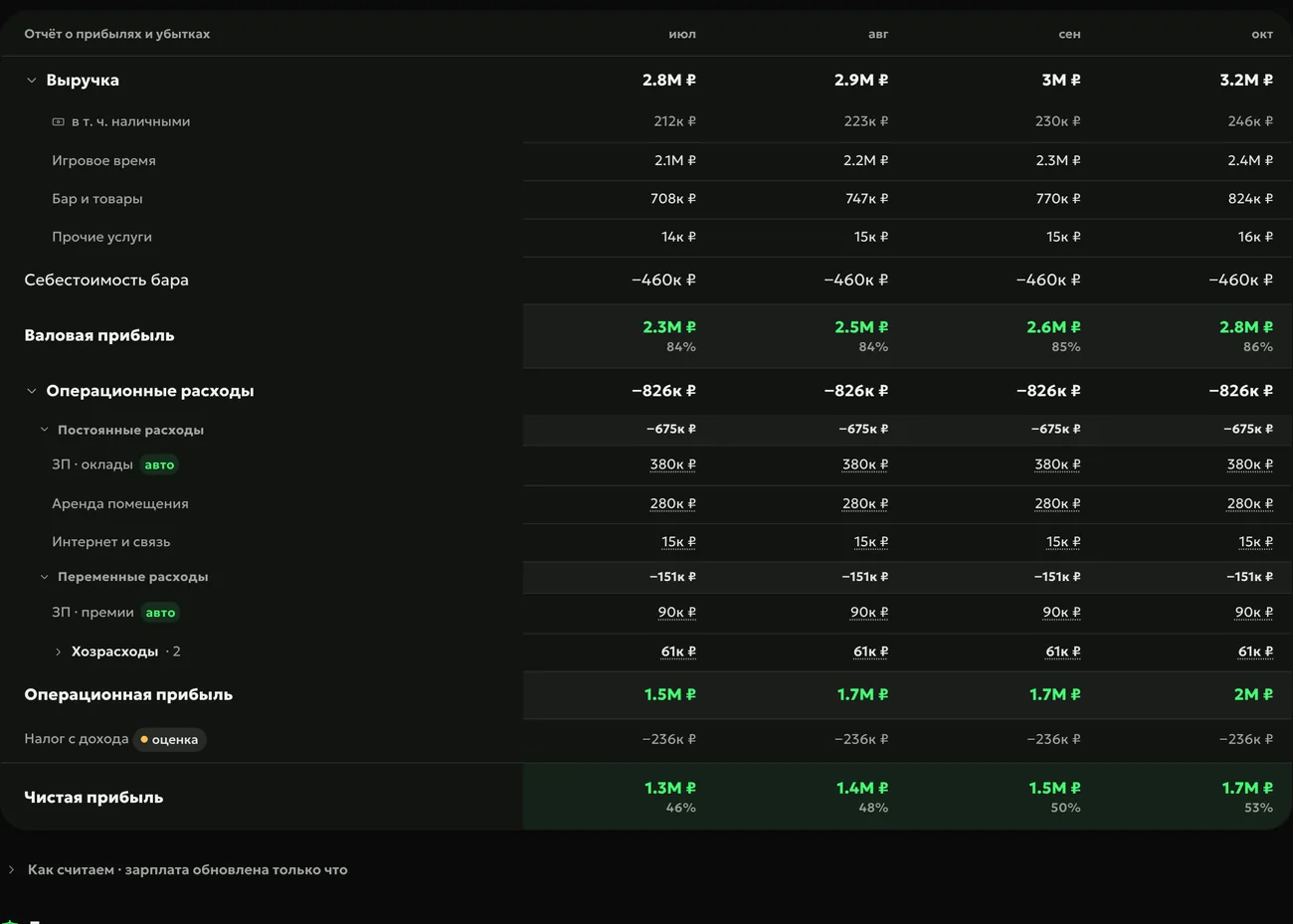
Profit and loss by month: revenue from play time, bar and services, bar cost of goods, payroll marked “auto”, rent, telecom, estimated tax and net profit

Remember

Accruals from Payroll go into the P&L by themselves, with base pay and bonuses on separate lines. What the club still owes employees shows in the balance, and the payment calendar lists payroll debt once — after that, the calendar estimates payroll from the previous month.

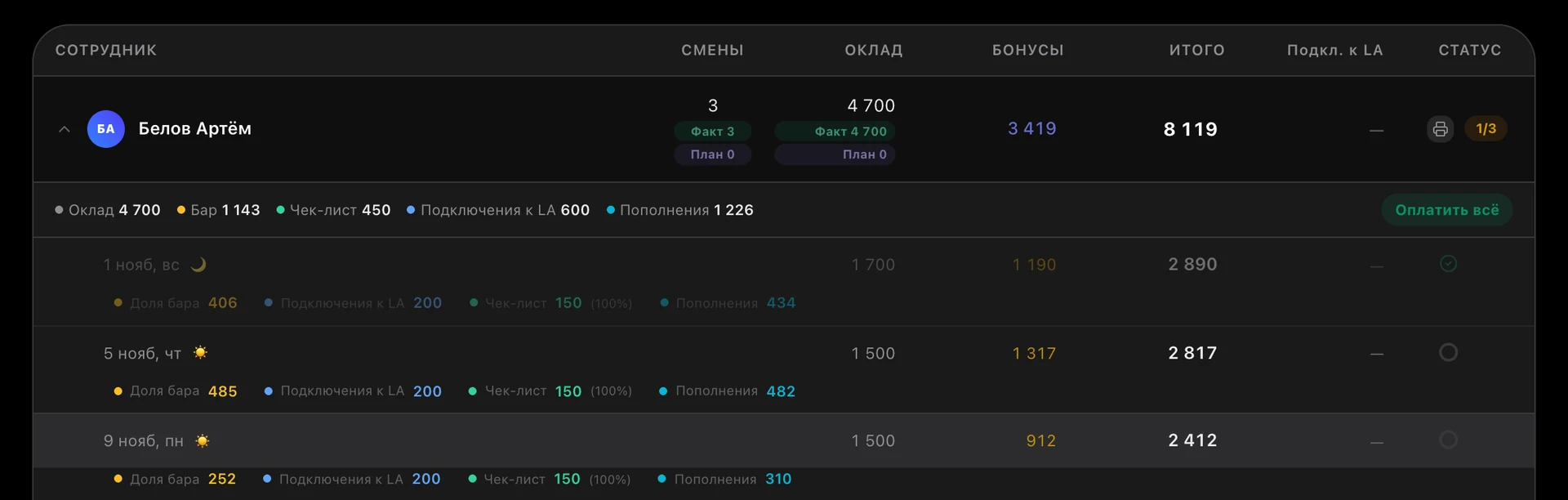
ERP, admin payroll for 3 shifts: base pay 4,700, bonuses 3,419, total 8,119; per shift — bar, Loot Arena sign-ups, checklist and top-ups

How to start

  1. Add accounts

    Cash register, bank account and “Acquiring” — the setup wizard usually creates them.

  2. Upload a statement

    A 1C or CSV file from online banking: lines are sorted by themselves, the rest wait in “To sort”.

  3. Open “Profit”

    Net profit for the month — for the club and for each legal entity.

Owners’ questions

Didn’t find the answer? Message us in Telegram — the product team replies.

@loot_arena_support
Do I need an accountant to run the finance ledger?

No: revenue, payroll and deliveries come in by themselves, and the ledger sorts the bank statement by rules. Tax reporting is still your accountant’s job — the ledger shows the management picture: where the money is, how much the club earned and what is due.

Which bank statements can I upload?

A 1C file (.txt) or CSV from online banking. If a 1C file holds several accounts, each lands in its own wallet, and the ledger won’t accept a statement from a legal entity that isn’t yours.

How is tax counted in profit?

Only for Russian tax regimes: USN 6% and AUSN 8% on income, USN 15% and AUSN 20% on income minus expenses with a minimum tax, and the patent as its annual cost divided by 12. For a legal entity outside Russia the ledger does not estimate tax — profit is shown without it. A month without a full bank statement is marked “preliminary”.

Who on the team sees the finance ledger?

Only the owner, by default. Employees get access tab by tab, and deleting entries and statements always stays with the owner.

Which module includes the finance ledger?

Operations, together with payroll, purchasing and the shift console — $129 a month per club. The finance ledger works for clubs on LanGame, SmartShell and Gizmo.

Try Loot Arena

7 days on your club’s data: the shell integration by API is already set up, and every feature is open with no limits. It all happens by itself — your access arrives by email.

Who are you?
I play at a clubMissions and rewards live in the free Loot Arena app. No demo needed.